The two moments that matter most in any online gaming experience are not the bets you place or the games you play. They are the moment you add funds to your account and the moment you take money out. Everything in between depends on these two transactions working smoothly, quickly, and exactly as expected.
For Indian players, deposit and withdrawal experience is shaped by factors that do not apply in the same way to players in other markets. Payment methods need to match what Indian players actually use. Transactions need to process in INR without conversion fees. Withdrawal speeds need to be fast enough to make the experience feel trustworthy rather than anxious. And the process needs to work on mobile—because that is where most Indian players manage their accounts.
This guide covers everything about WazirWin deposit and withdrawal — how each process works step by step, which methods are available, what affects processing speed, how to avoid the common issues that slow transactions down, and exactly what to do when something does not go as expected.
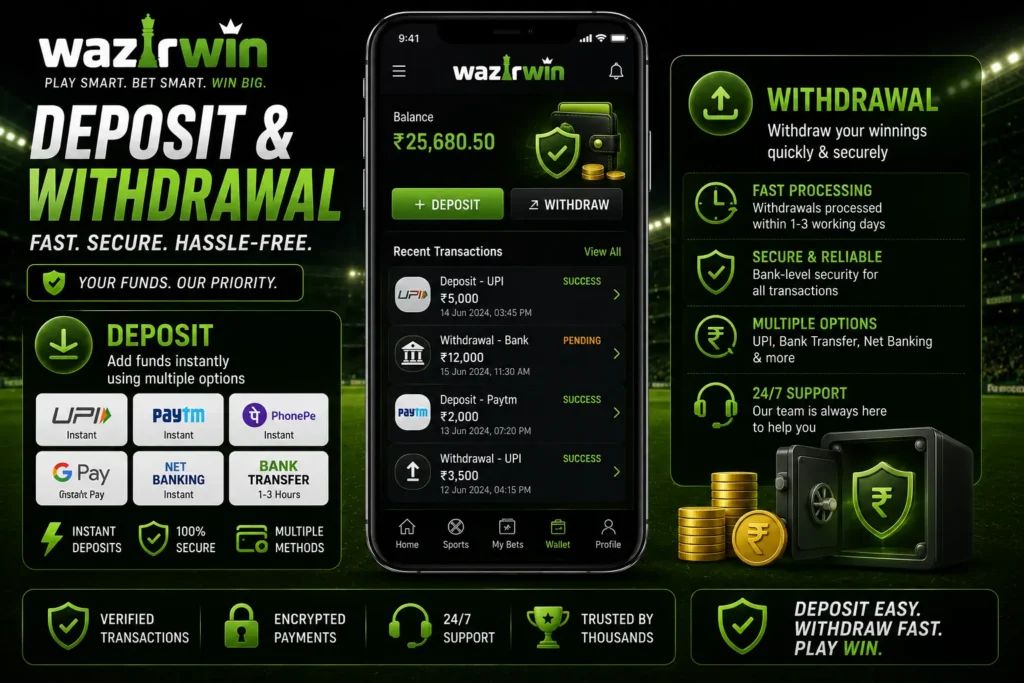
Table of Contents
Deposits — How They Work
The WazirWin deposit and withdrawal system is built around Indian payment infrastructure, making it straightforward from the very first transaction. A deposit is the starting point for everything else on the platform. Getting it right — choosing the right method, understanding the process, and knowing what to expect — sets the foundation for a smooth gaming experience from the beginning.
Available Deposit Methods
The platform supports the full range of Indian digital payment methods, all processing in INR with no currency conversion fees.
UPI — Unified Payments Interface
UPI is the fastest and most straightforward deposit method available. It works through every major banking and payment app — Google Pay, PhonePe, Paytm, BHIM, and all major bank UPI apps. Most Indian players already have UPI configured on their phones before they ever make a gaming deposit, which means there is no setup required and no learning curve.
In our experience, UPI is generally the quickest payment option for Indian users. While many deposits are reflected within a few minutes, actual processing time can vary depending on banking networks, payment provider availability, and verification status. Once the payment is successfully approved in your preferred UPI app, the funds are usually credited to your gaming account shortly afterwards.
Paytm
Paytm wallet deposits are fast and familiar for players who maintain a Paytm balance for everyday spending. The deposit process is straightforward — select Paytm, enter the amount, and the funds are deducted from your wallet balance and credited to your gaming account. Many players find it useful to use their Paytm wallet specifically for gaming deposits, keeping their gaming budget cleanly separated from their main bank account.
PhonePe
PhonePe operates both as a UPI-enabled payment app and a digital wallet, making it one of the most versatile deposit options. PhonePe deposits process on UPI infrastructure—meaning they are among the fastest available—and are completely familiar to the large number of Indian players who use PhonePe as their primary payment app.
Net Banking
Net banking allows direct transfers from your bank account through your bank’s online portal, without involving a third-party wallet or UPI app. It is available across all major Indian banks and is the preferred option for players who want direct bank-to-platform transfers. Processing times are slightly longer than UPI—minutes rather than near-instant—but the method is unfailingly reliable.
Deposit Step-by-Step
Step-by-Step Deposit Process
Step 1—Open the Deposit Section
Log in to your account and navigate to the cashier or deposit section through the main account menu. This is accessible on both the mobile app and browser.
Step 2 — Select Your Payment Method
Choose from UPI, Paytm, PhonePe, or Net Banking. Select the method you use most regularly for the smoothest experience.
Step 3 — Enter the Amount
Enter your deposit amount in INR. Check the minimum deposit requirement displayed in the cashier at the time of deposit — this is the most current figure.
Step 4 — Complete the Payment
For UPI—you will be redirected to your preferred UPI app to approve the transaction. For Paytm and PhonePe, the amount is deducted from your wallet balance. For Net Banking—you will be redirected to your bank’s portal to authorize the transfer.
Step 5—Confirm the credit return to your gaming account and verify that the deposit has appeared in your balance. UPI and wallet deposits typically credit within two to three minutes. If your deposit has not been credited within 15 minutes of a confirmed payment, contact live chat immediately with your transaction reference number.
Withdrawals — How They Work
The most obvious test of the trust relationship between player and platform is at the point of withdrawal. The clearest sign of a platform’s integrity is quick, dependable withdrawals after a winning session.
What Affects Withdrawal Speed
Three factors determine how quickly a withdrawal reaches your account.
Verification Status:
This is the most important factor. Fully verified accounts — with completed KYC identity verification and a confirmed linked payment method — process withdrawals significantly faster than unverified or partially verified accounts. Players who complete KYC at registration, before they ever need to withdraw, avoid the delays that affect players who leave verification until their first withdrawal request.
Payment Method:
UPI withdrawals are the fastest available—funds typically arrive within a few hours of a processed request for fully verified accounts. Paytm and PhonePe withdrawals follow similar timeframes. Net banking withdrawals may take slightly longer depending on the receiving bank’s internal processing schedule.
Withdrawal Amount
Larger withdrawal amounts occasionally trigger additional review steps as a standard security measure. This is normal across all legitimate online gaming platforms and is not a cause for concern — it simply means larger withdrawals may take slightly longer to process than routine amounts.
Step-by-Step Withdrawal Process
Step 1 — Open the Withdrawal Section
Navigate to the cashier or withdrawal section of your account through the main account menu.
Step 2 — Select Your Withdrawal Method
Choose your preferred payment method. Withdrawals are typically processed back to the same method used for deposits — this is a standard security measure that prevents funds from being redirected to unverified accounts.
Step 3 — Enter the Amount
Enter the withdrawal amount in INR. Check the minimum and maximum withdrawal limits displayed in the cashier before submitting—these may vary by method and verification status.
Step 4 — Submit the Request
Confirm the withdrawal request. The platform begins processing once the request is submitted and account verification is confirmed.
Step 5 — Receive Your Funds
Funds arrive in your linked payment method once processing is complete. UPI withdrawals for verified accounts typically arrive within hours. Keep your payment app notifications active so you receive confirmation when funds arrive.
KYC Verification — Why It Matters for WazirWin Deposit and Withdrawal
KYC — Know Your Customer — is the identity verification process that every legitimate online gaming platform requires. It involves submitting a government-issued identity document — Aadhaar card, PAN card, or passport — to confirm that your account details match a verified identity.
For deposits, KYC affects which payment methods are available and whether any deposit limits apply to unverified accounts. For withdrawals, it is the primary determinant of processing speed — unverified accounts cannot process withdrawals until verification is complete.
The most common mistake Indian players make is leaving KYC until their first withdrawal request. Verification processing takes time. Players who submit verification documents at the same moment they want to withdraw experience delays that are entirely avoidable—because the verification would have cleared automatically if it had been submitted at registration.
Complete KYC at registration. It takes a few minutes, requires a clear photograph or scan of one government-issued document, and ensures that every future withdrawal process is at full speed without any additional verification holds.
WazirWin Deposit and Withdrawal Limits
Minimum and maximum limits apply to both deposits and withdrawals and may vary by payment method, verification status, and current platform terms.
Minimum deposit amounts are kept accessible — the platform is designed to work for players at every budget level, not just high-volume depositors. Minimum withdrawal amounts are similarly modest, meaning players do not need to accumulate a large balance before accessing their funds.
Maximum limits are higher for fully verified accounts than for unverified ones. Players who intend to deposit or withdraw larger amounts regularly should complete KYC verification early to ensure maximum limits are available when needed.
Always check the current limits displayed in your account’s cashier section before submitting a transaction—particularly for withdrawals above routine amounts. Limits are the most accurate when read directly from the platform rather than from any external source.
Common Deposit and Withdrawal Issues (and How to Fix Them)
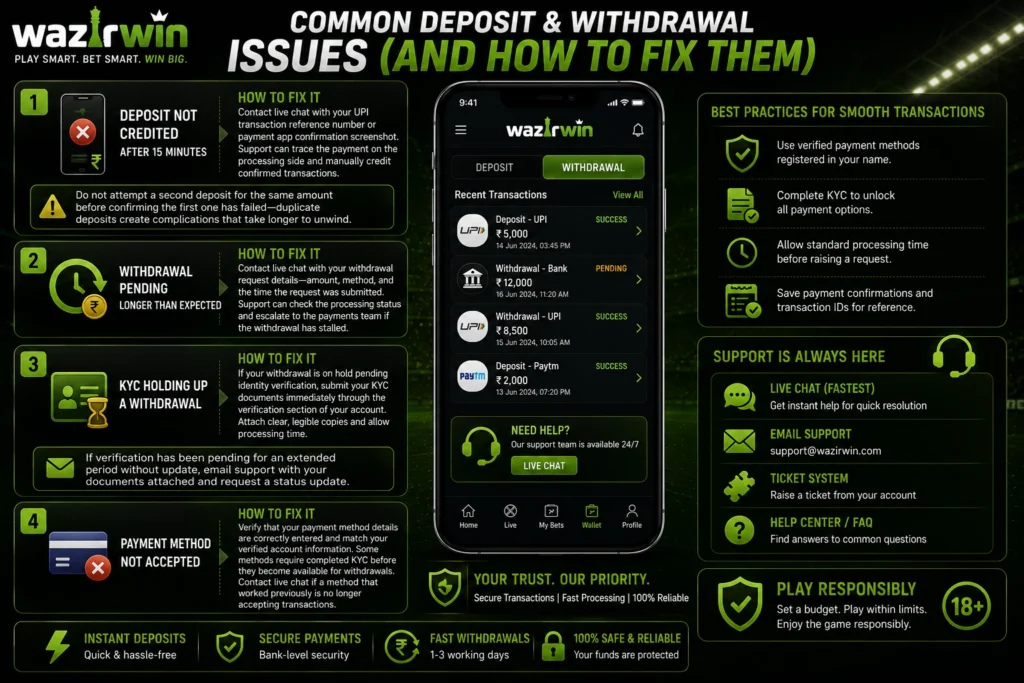
Deposit not credited after 15 minutes
Contact live chat with your UPI transaction reference number or payment app confirmation screenshot. Support can trace the payment on the processing side and manually credit confirmed transactions. Do not attempt a second deposit for the same amount before confirming the first one has failed—duplicate deposits create complications that take longer to unwind.
Withdrawal pending longer than expected
Contact live chat with your withdrawal request details—amount, method, and the time the request was submitted. Support can check the processing status and escalate to the payments team if the withdrawal has stalled.
KYC holding up a withdrawal
If your withdrawal is on hold pending identity verification, submit your KYC documents immediately through the verification section of your account. Attach clear, legible copies and allow processing time. If verification has been pending for an extended period without update, email support with your documents attached and request a status update.
Payment method not accepted
Verify that your payment method details are correctly entered and match your verified account information. Some methods require completed KYC before they become available for withdrawals. Contact live chat if a method that worked previously is no longer accepting transactions.
Practical Tips for Smooth Transactions
Complete KYC at registration, not at withdrawal. This single step eliminates the most common cause of withdrawal delays before it ever becomes a problem.
Use UPI for both deposits and withdrawals. It is the fastest method available for both directions and the most widely compatible with Indian banking infrastructure.
Keep your payment details current. If your UPI ID or bank account details change, update them in your account immediately. Withdrawal requests to outdated payment details require support intervention to redirect.
Check promotions before depositing. A thirty-second review of current bonus offers before adding funds ensures you never miss a reload bonus or deposit match offer that was active at exactly the moment you were depositing anyway.
Screenshot payment confirmations. A screenshot of your payment app confirmation—showing the amount, time, and transaction reference—is the most useful thing you can have if a deposit does not credit as expected. Buy it on payment rather than chasing it later.
Deposit methods, withdrawal processing times, transaction limits, bonus availability, and verification requirements can change over time. Always check your WazirWin account for the latest information and review the platform’s current terms and conditions before you make any financial transactions.
Final Thoughts
Deposits and withdrawals are not the exciting part of online gaming. They are the functional foundation that everything else depends on. When they work smoothly — fast deposits, reliable withdrawals, no friction at either end — they become invisible. When they do not, they become the only thing that matters.
The WazirWin deposit and withdrawal infrastructure is built around Indian players—UPI, Paytm, PhonePe, and Net Banking, all in INR, all without conversion fees. Complete KYC early, use UPI for the fastest processing, and keep your payment details updated, and transactions will work exactly as they should—quietly and reliably in the background, letting you focus on the cricket betting and gaming experience the platform is built for.
Explore more platform guides, betting insights, and the latest updates on WazirWin to make the most of your cricket gaming experience.
Frequently Asked Questions
-
What deposit methods are available for WazirWin deposit and withdrawal?
UPI, Paytm, PhonePe, and Net Banking — all processing in Indian Rupees with no currency conversion fees.
-
How long do deposits take to credit?
UPI and wallet deposits typically credit within two to three minutes. Net banking deposits may take a few minutes longer. If a deposit has not been credited within 15 minutes of confirmed payment, contact live chat.
-
How long do withdrawals take?
Fully verified accounts using UPI typically receive withdrawals within a few hours. Processing times vary by method and verification status. Net banking withdrawals may take slightly longer depending on the receiving bank.
-
Do I need KYC to withdraw?
Yes. Identity verification is required before withdrawals are processed. Complete KYC at registration to avoid delays at the point of withdrawal.
-
Are there fees on deposits or withdrawals?
No currency conversion fees apply on INR transactions. Check current platform terms for any applicable transaction fees, as these may vary by method or be updated over time.
-
What should I do if my deposit has not been credited?
Wait 15 minutes from confirmed payment, then contact live chat with your transaction reference number. Do not attempt a second deposit for the same amount before confirming the first has failed.
-
Can I withdraw to a different method than I deposited with?
Withdrawals are typically processed back to the original deposit method as a security measure. Contact support if you need to update your linked withdrawal method.